mylbs.

Back up your entire LBS Canvas account.

Every slide, case study, problem set, submission and classmate's name — pulled into one searchable archive you can keep after your enrolment ends. Files that Canvas locks the day after a deadline? We grab those too, while you still can.

Paste your Canvas access token

This is what lets us read your courses on your behalf. You generate it once, in your Canvas settings, and revoke it anytime.

  1. Open learning.london.edu/profile/settings
  2. Scroll to Approved Integrations → click + New Access Token (see screenshot)
  3. Purpose: mylbs. Click Generate.
  4. Copy the token (it's only shown once) and paste it here.
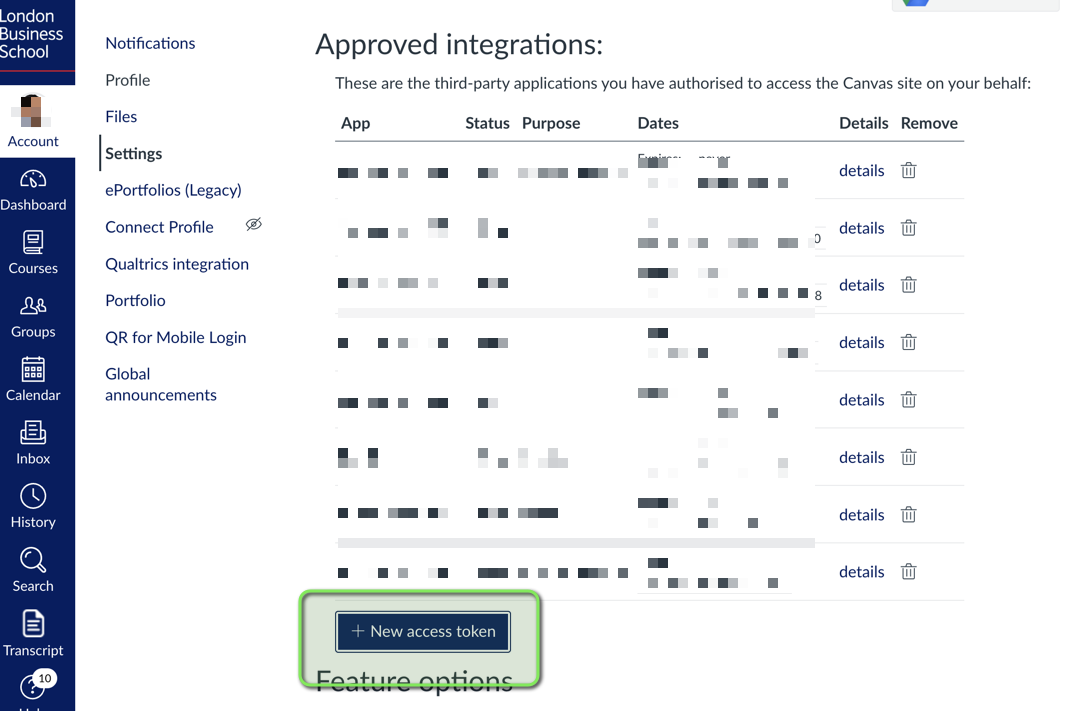
Canvas Approved Integrations page with the '+ New access token' button highlighted
The button is at the bottom of the Approved Integrations table.

What we do with your token:

  • Use it once to run your extraction.
  • Never write it to disk. Never log it.
  • Wipe it from memory the moment your job finishes.
  • You can revoke it from Canvas Settings the second you're done. We recommend doing so.

Walking your Canvas account

Queued…

    Files appearing in your archive 0

    Your archive is ready.

    Browse it below. When you're ready, head down to download a zip you can keep forever.

    Continue to download →

    Before you go — what's this worth to you?

    This is free for cohort members. But if it saved you time, please tell us what you would have paid. We're trying to figure out whether to build this for future cohorts and how much to charge.

    No card details. No charge. Just a number.

    📬 Check your @london.edu inbox.

    We've emailed your download link to .

    Your archive is stored encrypted on AWS for 7 days, then automatically deleted. If you want a fresh export later, just come back and run it again.

    Or download right now →

    Terms

    This service is provided as-is by a fellow LBS student. By using it you confirm:

    Privacy notice